> For the complete documentation index, see [llms.txt](https://docs.gpmautomate.com/llms.txt). Markdown versions of documentation pages are available by appending `.md` to page URLs; this page is available as [Markdown](https://docs.gpmautomate.com/automate-en/action-guide/phone-action/xpath-and-coordinates-guide.md).
# Guide to determine XPath & coordinates
Use the GPM UI Automator tool to obtain the XPath or coordinates of an element on the phone screen.
Many actions in the Phone - Action and Phone - Element groups need to point to an element on the phone screen via **XPath** or **coordinates**. You use the **GPM UI Automator** (Find XPath on BoxPhone) tool to obtain these values.
#### Steps to Perform:
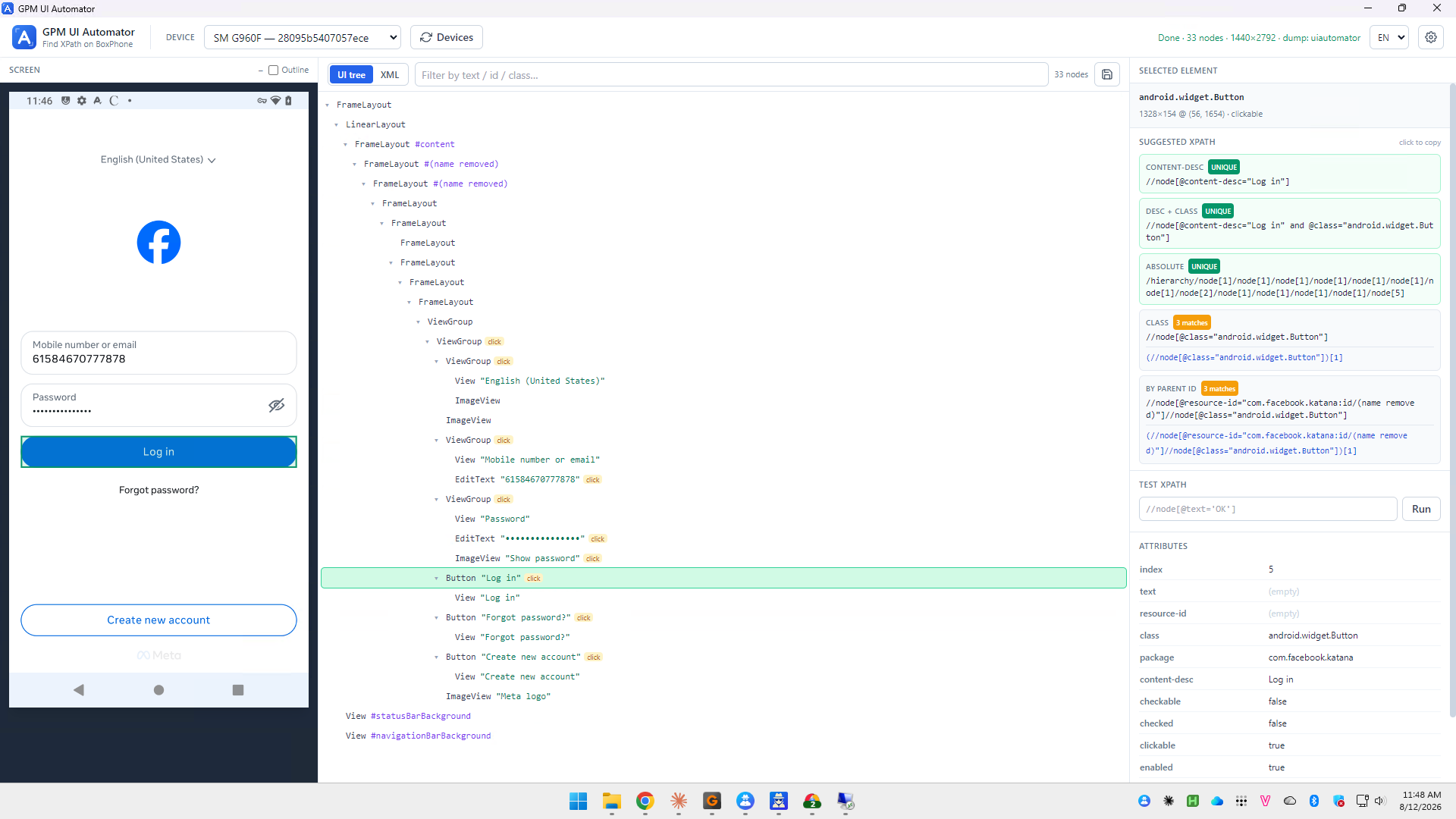
1. Select the device in the DEVICE box (e.g., `SM G960F`). Click Devices to refresh the list if the device is not visible.
2. Open the correct screen to operate on the phone, then click Capture to take a screenshot and build the UI tree. You can view it in tree (UI tree) or code (XML) format, and quickly filter using the Filter by text / id / class box.
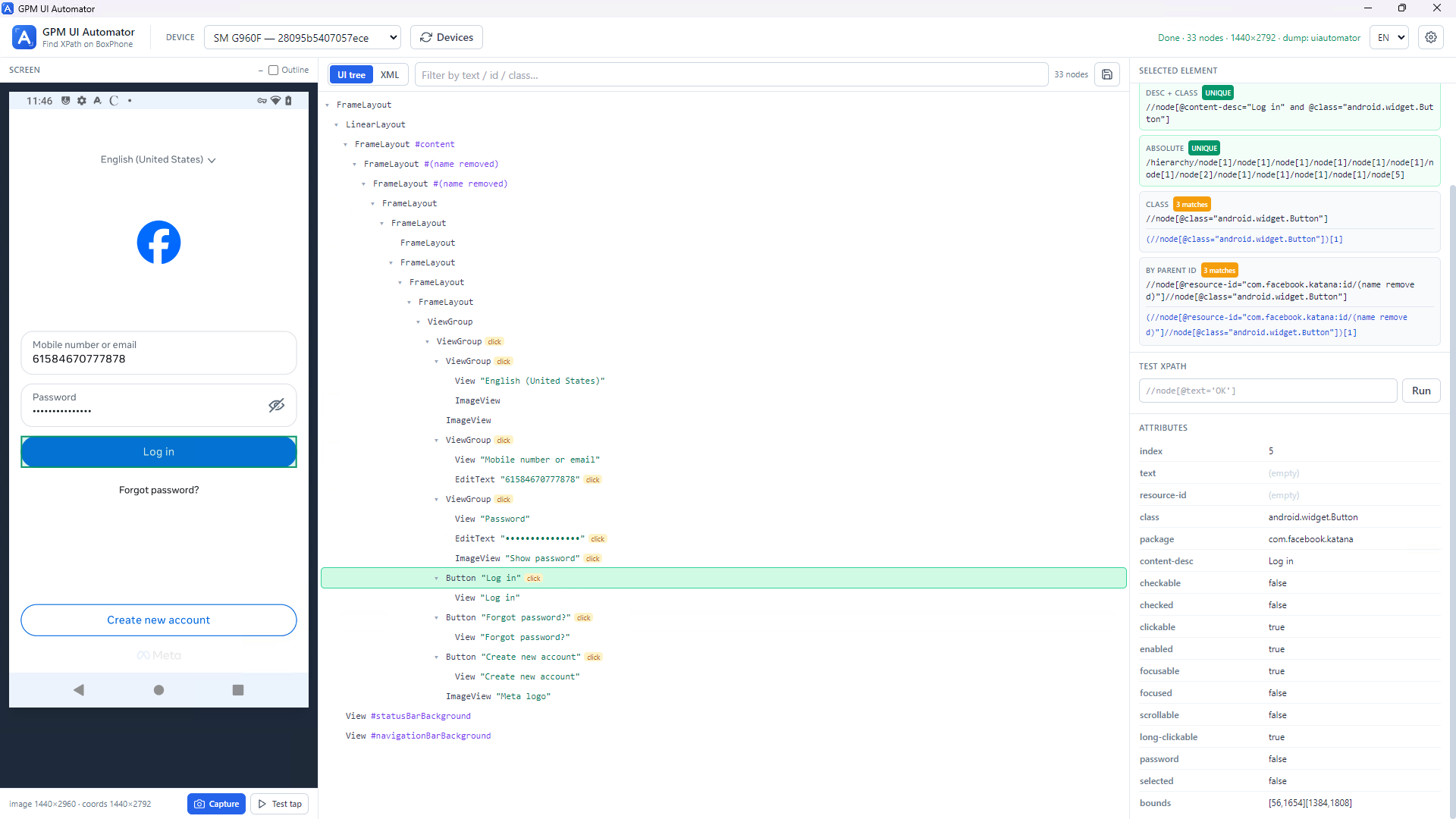
3. Click to select the element you need to obtain — either in the tree or directly on the screenshot on the left. The selected element will be highlighted, and information will appear in the SELECTED ELEMENT box on the right.
#### Obtain XPath:
The SUGGESTED XPATH box suggests various types of XPath along with labels indicating their accuracy:
* `UNIQUE`: matches exactly 1 element — should be prioritized for stable execution.
* `n matches`: matches multiple elements, which should be considered before use.
The suggested types include: CONTENT-DESC, DESC + CLASS, ABSOLUTE, CLASS, BY PARENT ID. Click "click to copy" to copy the XPath, then paste it into the XPath box of the action. You can verify it using the TEST XPATH box and then click Run.
#### Obtain Coordinates:
The ATTRIBUTES box displays the properties of the element, where `bounds` is the coordinate frame in the format `[x1,y1][x2,y2]`. The center coordinates of the element are the midpoint of this frame. Click Test tap to attempt to tap on the element for verification.
---
# Agent Instructions
This documentation is published with GitBook. GitBook is the documentation platform designed so that both humans and AI agents can read, navigate, and reason over technical content effectively. Learn more at gitbook.com.
## Querying This Documentation
If you need additional information that is not directly available in this page, you can query the documentation dynamically by asking a question.
Perform an HTTP GET request on the current page URL with the `ask` query parameter, and the optional `goal` query parameter:
```
GET https://docs.gpmautomate.com/automate-en/action-guide/phone-action/xpath-and-coordinates-guide.md?ask=&goal=
```
`ask` is the immediate question: it should be specific, self-contained, and written in natural language.
`goal` is optional and describes the broader end goal you are ultimately trying to accomplish on behalf of the user. GitBook uses it to tailor the answer towards what is most useful for that goal.
The response will contain a direct answer to the question and relevant excerpts and sources from the documentation.
Use this mechanism when the answer is not explicitly present in the current page, you need clarification or additional context, or you want to retrieve related documentation sections.