> For the complete documentation index, see [llms.txt](https://docs.gpmautomate.com/llms.txt). Markdown versions of documentation pages are available by appending `.md` to page URLs; this page is available as [Markdown](https://docs.gpmautomate.com/automate-zh/action-shi-yong-zhi-nan/mouse/mouse-try-to-click.md).
# Mouse try to click
Mouse try to click 是鼠标指令组中的高级操作,允许脚本对某个目标重复执行多次点击操作,直到满足预期条件才停止。
此操作是处理网站上"顽固"按钮(这类按钮有时会出现卡顿,需要连续点击几次才能生效)的完美解决方案,或用于抢(刷)领取奖励的按钮、短时间内出现的开宝箱按钮。
🎥 查看更多操作指南视频:[点击这里](https://youtu.be/kQZWs1I76Zo)。
#### 核心配置参数:
* Click type:与 Mouse click 操作类似,您也有 3 种选择方式来指定点击鼠标的位置:
1. *根据 XPath 点击*:系统查找元素的 HTML 标签进行点击。
2. *根据鼠标指针当前位置点击*:在鼠标指针静止不动的位置连续点击。
3. *根据坐标点击*:点击固定像素点,或传入组合坐标形式的变量,如 `900,800`(结合 *Image search* 操作的结果)。
* Number of tries:脚本允许执行的最大尝试点击次数(例如输入 `10`,系统将最多点击 10 次后自动停止该流程,转到下一个操作,避免脚本无限卡住)。
* Delay each clicks (s):两次连续点击之间的间隔时间,以秒计(例如输入 `0.5` 或 `1` 秒,以避免点击过快而被系统误判为垂直/DDoS 攻击)。
* Stop condition:使系统立即下达停止点击指令的条件。鼠标将持续点击,直到该条件被满足,或者已经点击了 *Number of tries* 中规定的次数为止。
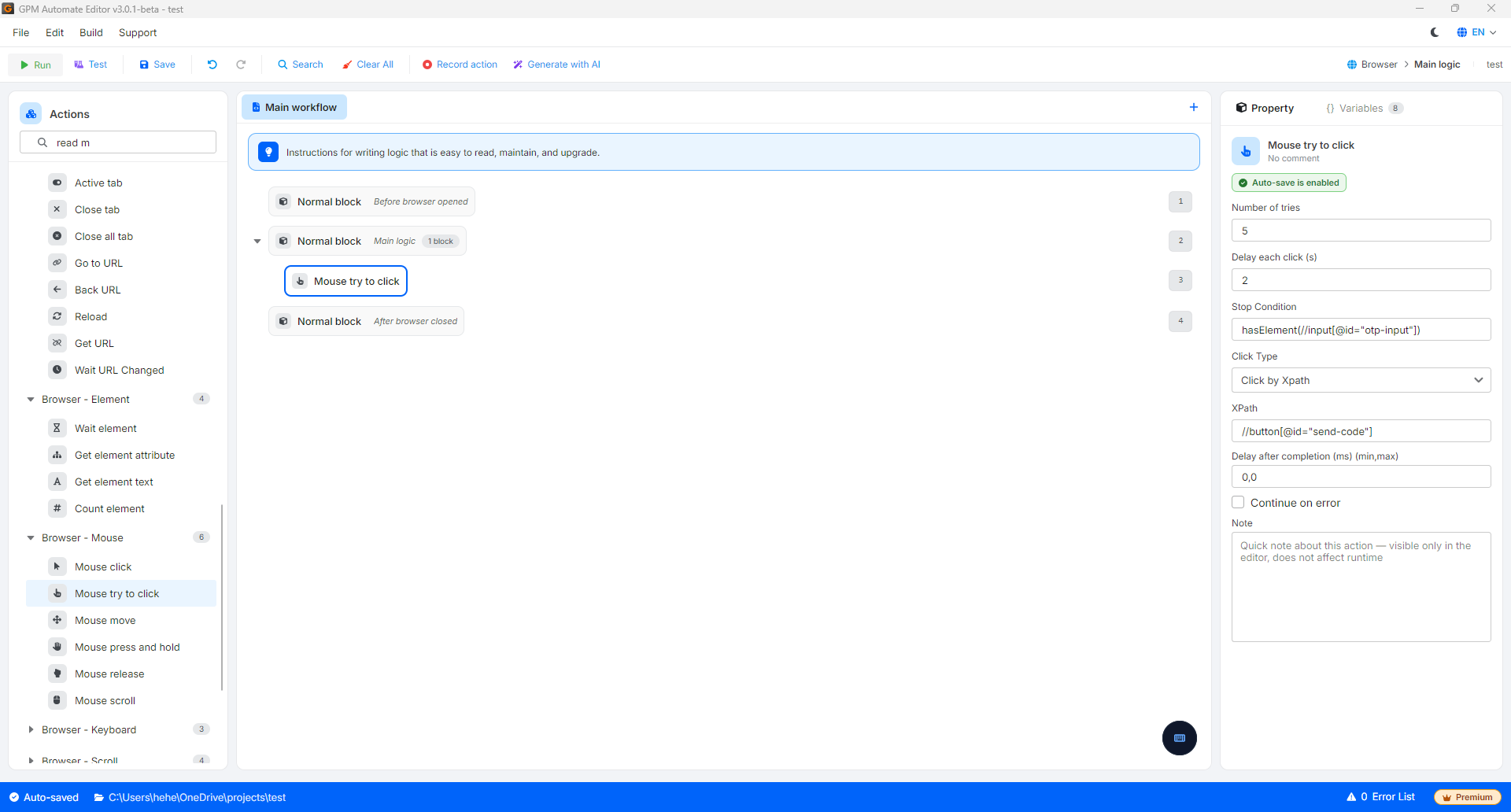
#### 实际示例:连续点击"获取 OTP 验证码"按钮,直到验证码输入框出现为止
当您在加载缓慢的网站上进行账户注册时,点击"发送验证码"(Send Code)按钮后,系统可能会出现卡顿,无法立即响应。此时您需要让鼠标持续点击,直到屏幕上出现一个 OTP 验证码输入框才能停止。
* 配置方式:
* Click type:选择 *根据 XPath 点击* ➔ 输入发送验证码按钮的 XPath:`//button[@id="send-code"]`。
* Number of tries:输入 `5`(最多尝试 5 次)。
* Delay each clicks:输入 `2`(每次点击间隔 2 秒,以等待网页处理)。
* Stop condition:使用检查元素是否出现的函数:`hasElement(//input[@id="otp-input"])`。
运行逻辑:系统将鼠标移到发送验证码按钮并进行第 1 次点击。2 秒后,系统检查 OTP 验证码输入框(`//input[@id="otp-input"]`)是否已经出现。如果还没有出现,系统继续进行第 2 次、第 3 次点击……当点击到第 3 次时,系统响应并使 OTP 验证码输入框显示在屏幕上(`hasElement` 函数返回真值),脚本将立即停止此点击操作,并转到下一步,而不需要再执行剩余的 2 次点击。
> 💡 扩展技巧:您也可以使用否定条件 `!hasElement(XPATH)`,让鼠标持续点击,直到某个广告横幅或页面加载中的旋转图标(loading)从屏幕上消失为止。
---
# Agent Instructions
This documentation is published with GitBook. GitBook is the documentation platform designed so that both humans and AI agents can read, navigate, and reason over technical content effectively. Learn more at gitbook.com.
## Querying This Documentation
If you need additional information that is not directly available in this page, you can query the documentation by asking a question.
Perform an HTTP GET request on the following URL with the `ask` and `goal` query parameters:
```
GET https://docs.gpmautomate.com/automate-zh/action-shi-yong-zhi-nan/mouse/mouse-try-to-click.md?ask=&goal=
```
`ask` is the immediate question: it should be specific, self-contained, and written in natural language.
`goal` is what the user is ultimately trying to achieve, the reason they need the answer. Sharing it helps GitBook give you a better, more relevant answer. A goal is most helpful when it describes the outcome the user wants rather than restating the question. For example, with `ask=how do I create an API token`, a goal like `automate deployments from our CI pipeline` lets GitBook tailor the answer to that use case.
The response will contain a direct answer to the question and relevant excerpts and sources from the documentation.
Use this mechanism when the answer is not explicitly present in the current page, you need clarification or additional context, or you want to retrieve related documentation sections.