> For the complete documentation index, see [llms.txt](https://docs.gpmautomate.com/llms.txt). Markdown versions of documentation pages are available by appending `.md` to page URLs; this page is available as [Markdown](https://docs.gpmautomate.com/automate-zh/action-shi-yong-zhi-nan/phone-action/xpath-and-coordinates-guide.md).
# 确定 XPath 和坐标的指南
使用 GPM UI Automator 工具获取手机屏幕上元素的 XPath 或坐标。
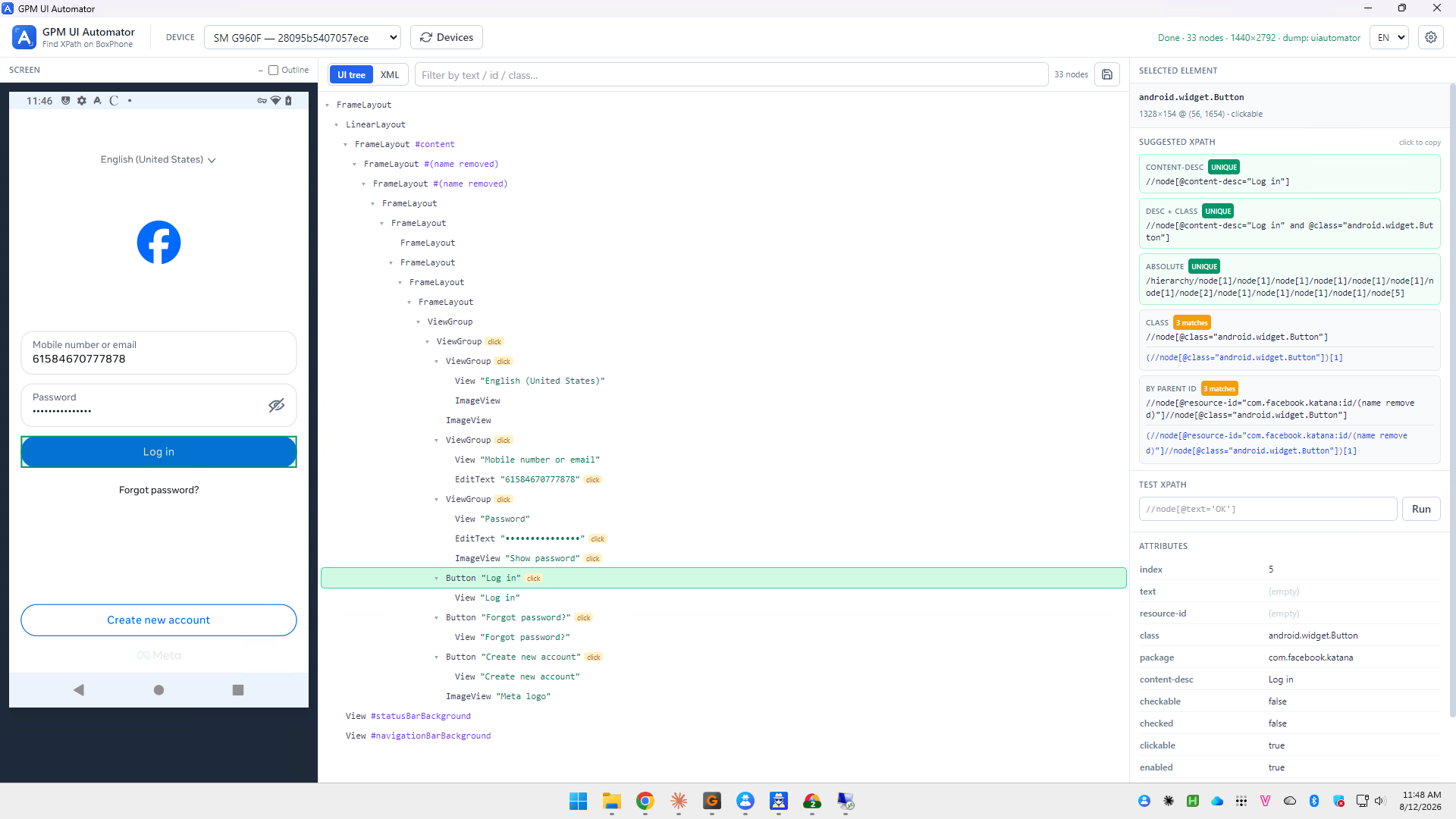
在 Phone - Action 和 Phone - Element 组中的许多 action 需要通过 **XPath** 或 **坐标** 指向手机屏幕上的一个元素。您可以使用 **GPM UI Automator**(Find XPath on BoxPhone)来获取这些值。
#### 执行步骤:
1. 在 DEVICE 框中选择设备(例如 `SM G960F`)。如果未看到设备,请点击 Devices 刷新列表。
2. 打开手机上需要操作的正确屏幕,然后点击 Capture 以捕捉并重建界面树。可以查看树形结构(UI tree)或代码(XML),通过文本 / id / class 过滤快速查找。
3. 点击需要获取的元素——在树中或左侧的屏幕截图上。所选元素将高亮显示,并在右侧的 SELECTED ELEMENT 框中显示信息。
#### 获取 XPath:
SUGGESTED XPATH 框中建议了多种类型的 XPath,并附有指示准确度的标签:
* `UNIQUE`: 仅匹配一个元素——应优先使用以确保稳定运行。
* `n matches`: 匹配多个元素,使用前需谨慎考虑。
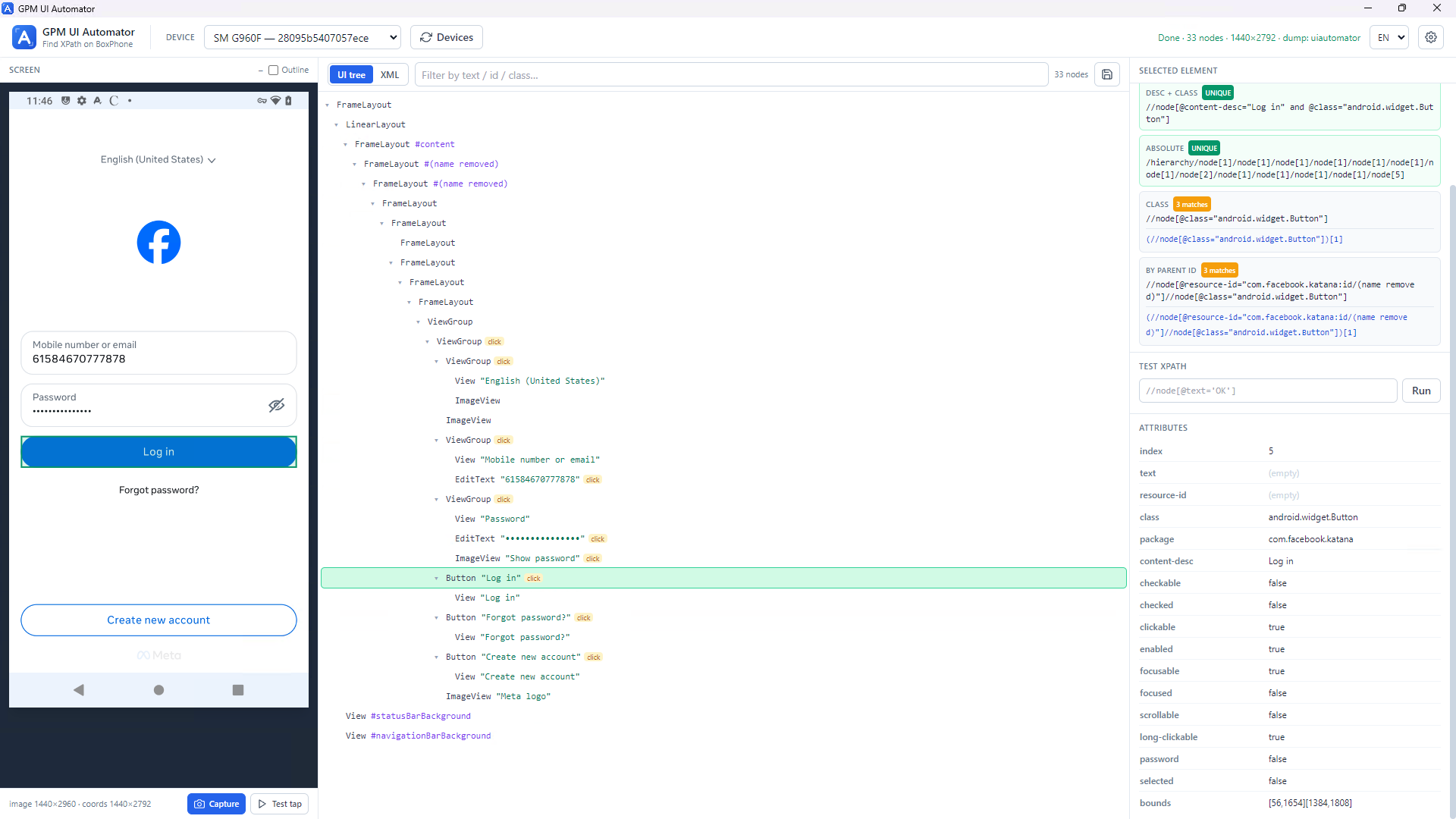
建议的类型包括:CONTENT-DESC、DESC + CLASS、ABSOLUTE、CLASS、BY PARENT ID。点击 "click to copy" 复制 XPath,然后粘贴到 action 的 XPath 框中。可以通过 TEST XPATH 框进行检查,然后点击 Run。
#### 获取坐标:
ATTRIBUTES 框显示元素的属性,其中 `bounds` 是坐标框的形式为 `[x1,y1][x2,y2]`。元素的中心坐标是该框的中点。点击 Test tap 尝试点击元素以进行检查。
---
# Agent Instructions
This documentation is published with GitBook. GitBook is the documentation platform designed so that both humans and AI agents can read, navigate, and reason over technical content effectively. Learn more at gitbook.com.
## Querying This Documentation
If you need additional information that is not directly available in this page, you can query the documentation dynamically by asking a question.
Perform an HTTP GET request on the current page URL with the `ask` query parameter, and the optional `goal` query parameter:
```
GET https://docs.gpmautomate.com/automate-zh/action-shi-yong-zhi-nan/phone-action/xpath-and-coordinates-guide.md?ask=&goal=
```
`ask` is the immediate question: it should be specific, self-contained, and written in natural language.
`goal` is optional and describes the broader end goal you are ultimately trying to accomplish on behalf of the user. GitBook uses it to tailor the answer towards what is most useful for that goal.
The response will contain a direct answer to the question and relevant excerpts and sources from the documentation.
Use this mechanism when the answer is not explicitly present in the current page, you need clarification or additional context, or you want to retrieve related documentation sections.