> For the complete documentation index, see [llms.txt](https://docs.gpmautomate.com/llms.txt). Markdown versions of documentation pages are available by appending `.md` to page URLs; this page is available as [Markdown](https://docs.gpmautomate.com/automate-zh/gai-shu/ai-workflow-generation-guide.md).
# 🛠️Gen AI Workflow 功能指南(使用 AI 创建脚本)
Gen AI Workflow 功能允许您仅通过自然语言描述来创建完整的自动化脚本。简单来说,就是 AI 自动帮您浏览网页——在 GPM Automate 中预先配置好的 AI 会自动读取内容、分析需求,并结合实际浏览网页的 Agent 来分析页面的完整结构,获取如真人操作般精确的 XPath,然后自动生成各种 action 并推送到 workflow 中。
🎥 查看更多视频教程:[点击这里](https://youtu.be/gsLU5H95fl8)。
> 注意:Gen AI Workflow 功能目前支持在 Live 模式下运行时,直接分析 GPM Login 中的 profile。
### ⚙️ Gen AI Workflow 执行流程
要开始通过 AI 创建自动化脚本的过程,请按以下步骤操作:
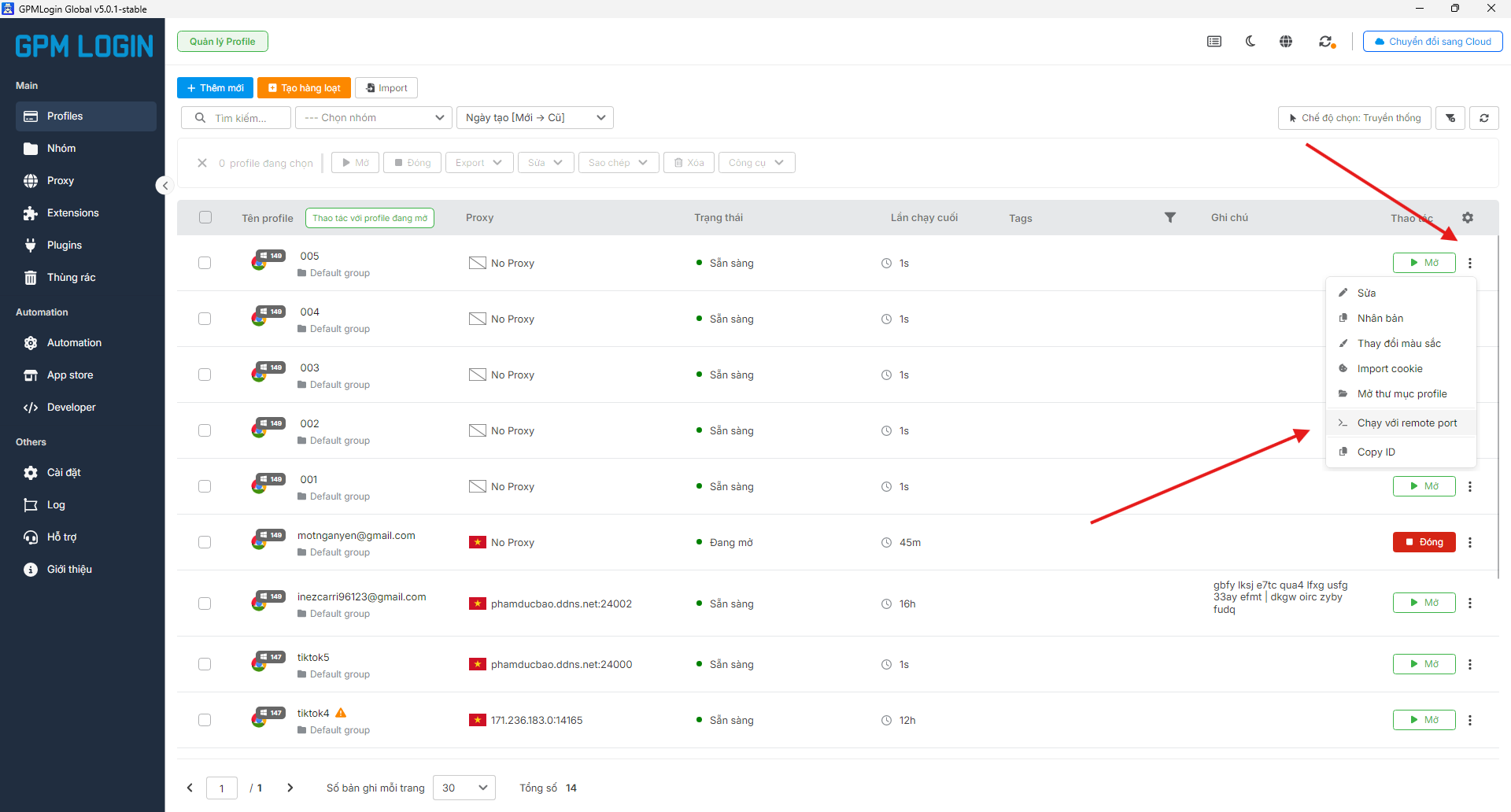
#### 1️⃣ 第一步:在 GPM Login 中配置 profile
* 打开 GPM Login。
* 找到您想用来测试的 profile。
* 点击 profile 名称旁边的三个点图标。
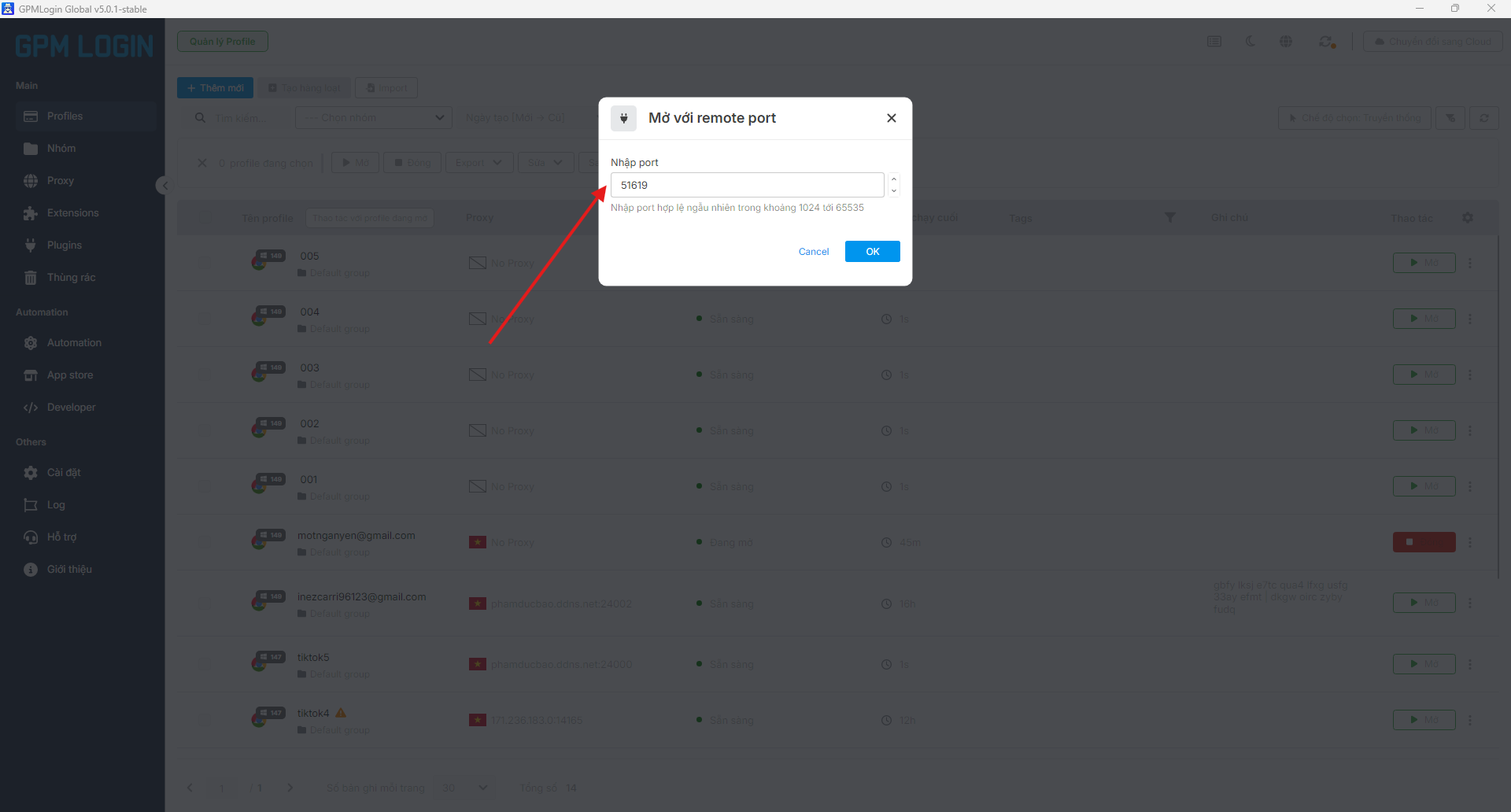
* 选择"以远程端口运行"以获取控制端口参数。
> 说明:打开远程端口相当于建立一座"桥梁",使 AI 和 GPM Automate 能够直接控制并访问正在打开的浏览器 profile,以实时浏览网页并读取页面结构。
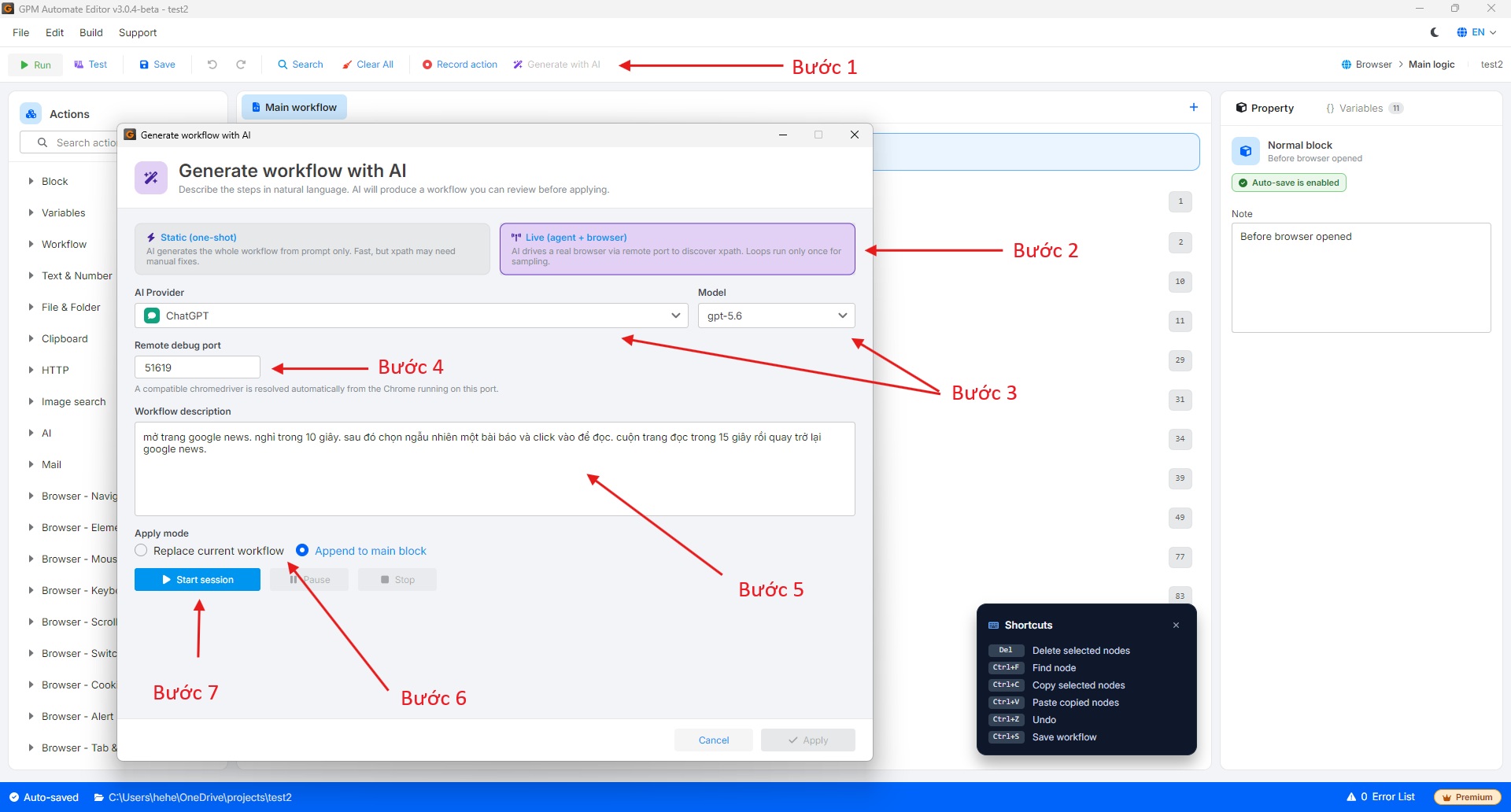
#### 2️⃣ 第二步:在 GPM Automate 中进行设置
* 在 GPM Automate 的工具栏上,选择 **Generate with AI**。
* Gen AI 配置窗口将会显示以下参数:
* **Remote debug port:** 将第一步中从 GPM Login 获取的端口(Port)粘贴到此栏中,以连接到该 profile。
* **模式(Mode):**
* **Static:** 根据脚本自动生成,AI 会自行虚构 XPath,没有 Agent 浏览网页。
* **Live:** Agent 直接浏览网页,读取页面的完整结构,并获取如真人般精确的 XPath。
* **AI Provider:** 选择 AI 提供商(**ChatGPT/OpenAI**、**Claude**、**Gemini**、**DeepSeek** 或已在 GPM Automate 的设置部分自行配置的 **Custom AI**),然后选择合适的 **Model**。
* **Workflow Description:** 输入您想要创建的自然语言指令/脚本描述。
* **Apply Mode:**
* **Replace current workflow:** 替换整个当前脚本。
* **Append to main block:** 将新的 action 追加到主脚本的末尾。
* 点击 **Start session**,浏览器将自动打开并执行脚本分析过程。
#### 3️⃣ 第三步:查看结果
* 浏览器自动运行且系统完成 Generate 过程后,点击 **Apply** 将刚生成的 action 推送到 workflow 中。
* 您可以查看被插入到 GPM Automate 界面中的各个命令块,并进行脚本测试,如有需要可进行微调。
---
# Agent Instructions
This documentation is published with GitBook. GitBook is the documentation platform designed so that both humans and AI agents can read, navigate, and reason over technical content effectively. Learn more at gitbook.com.
## Querying This Documentation
If you need additional information that is not directly available in this page, you can query the documentation dynamically by asking a question.
Perform an HTTP GET request on the current page URL with the `ask` query parameter, and the optional `goal` query parameter:
```
GET https://docs.gpmautomate.com/automate-zh/gai-shu/ai-workflow-generation-guide.md?ask=&goal=
```
`ask` is the immediate question: it should be specific, self-contained, and written in natural language.
`goal` is optional and describes the broader end goal you are ultimately trying to accomplish on behalf of the user. GitBook uses it to tailor the answer towards what is most useful for that goal.
The response will contain a direct answer to the question and relevant excerpts and sources from the documentation.
Use this mechanism when the answer is not explicitly present in the current page, you need clarification or additional context, or you want to retrieve related documentation sections.