> For the complete documentation index, see [llms.txt](https://docs.gpmautomate.com/llms.txt). Markdown versions of documentation pages are available by appending `.md` to page URLs; this page is available as [Markdown](https://docs.gpmautomate.com/automate-zh/gai-shu/setup-configuration-to-run-script/explanation-of-excel-data-config-parameters-use-input-excel.md).
# 2. Excel 数据配置参数说明(Use input Excel)
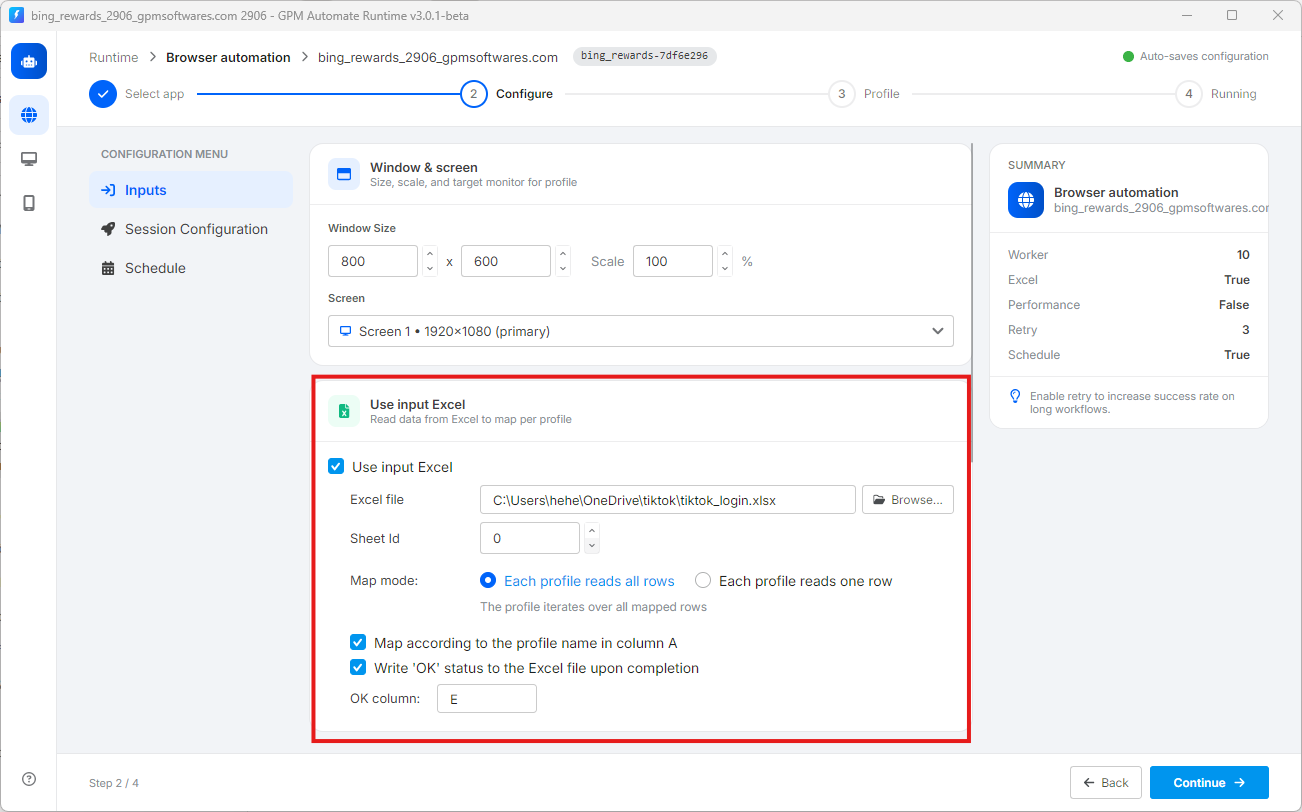
当您勾选 Use input Excel 后,系统将显示以下详细参数,用于管理数据的读取/写入方式:
* 📂 Excel file:点击 `Browse...` 按钮从您的电脑中选择输入数据文件。系统支持常见的文件格式,如 `.xlsx`、`.xls` 或 `.csv`。
* 📄 Sheet Id:选择您希望工具读取数据的 Excel 文件中工作表(Sheet)的编号。该数值从 `0` 开始计算(对应您 Excel 文件中最左侧的第一个 Sheet)。
* 🔄 Map mode(读取行模式):此部分决定了浏览器 Profile 获取 Excel 数据的方式:
* Each profile reads all rows:每个浏览器 Profile 启动后,将依次读取并运行 Excel 文件中的所有数据行。
* Each profile reads one row:每个浏览器 Profile 仅获取一行数据进行处理(适用于每行代表一个独立账号信息的情况)。
* 🆔 Map according to the profile name in column A:如果勾选此项,工具将自动进行对照:当前正在运行的 GPM Login Profile 名称与 Excel 文件 A 列中某一行的文字相符,则会直接跳转到该行读取数据。
* ✅ Write 'OK' status to the Excel file upon completion:脚本运行完成后,自动在 Excel 文件中写入 'OK' 字样。此功能可帮助您轻松追踪哪一行、哪个账号已被工具成功处理。
---
# Agent Instructions
This documentation is published with GitBook. GitBook is the documentation platform designed so that both humans and AI agents can read, navigate, and reason over technical content effectively. Learn more at gitbook.com.
## Querying This Documentation
If you need additional information that is not directly available in this page, you can query the documentation dynamically by asking a question.
Perform an HTTP GET request on the current page URL with the `ask` query parameter, and the optional `goal` query parameter:
```
GET https://docs.gpmautomate.com/automate-zh/gai-shu/setup-configuration-to-run-script/explanation-of-excel-data-config-parameters-use-input-excel.md?ask=&goal=
```
`ask` is the immediate question: it should be specific, self-contained, and written in natural language.
`goal` is optional and describes the broader end goal you are ultimately trying to accomplish on behalf of the user. GitBook uses it to tailor the answer towards what is most useful for that goal.
The response will contain a direct answer to the question and relevant excerpts and sources from the documentation.
Use this mechanism when the answer is not explicitly present in the current page, you need clarification or additional context, or you want to retrieve related documentation sections.