> For the complete documentation index, see [llms.txt](https://docs.gpmautomate.com/llms.txt). Markdown versions of documentation pages are available by appending `.md` to page URLs; this page is available as [Markdown](https://docs.gpmautomate.com/automate-zh/gai-shu/setup-configuration-to-run-script/session-configuration.md).
# 4. Session Configuration(运行会话配置)
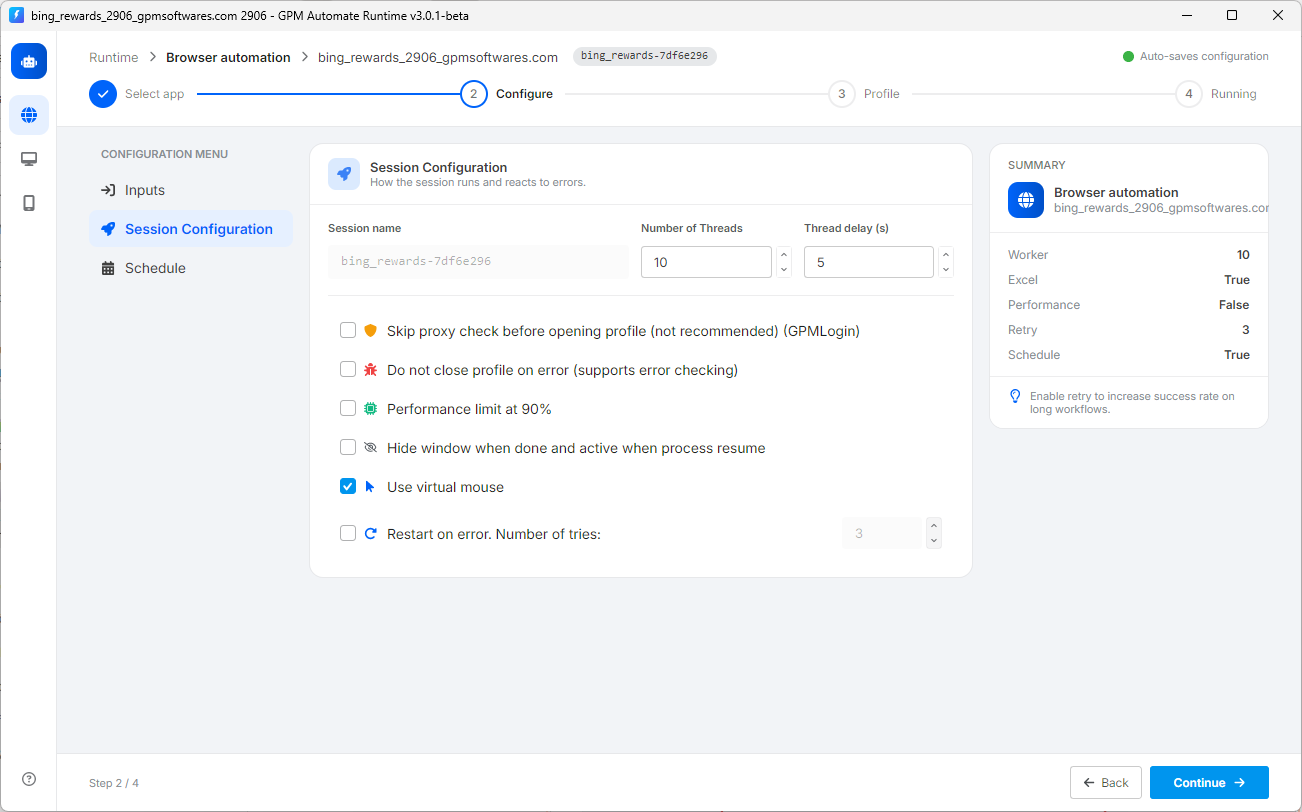
此部分用于设置脚本运行的方式、流程处理逻辑以及批量运行时应对错误情况的方式。具体参数如下:
* 🔢 Number of Threads(并行运行线程数):填写您想要软件同时打开并运行的浏览器 Profile 数量(如图中示例为 `10` 个线程)。请根据电脑性能强弱来调整此数值以确保运行流畅。
* ⏱️ Thread delay (s)(线程开启延迟时间):本线程与下一个线程之间的间隔时间(以秒为单位)。建议设置为 3-5 秒左右,以避免电脑同时开启过多浏览器导致卡顿。
* 🛡️ Skip proxy check before opening profile:勾选此项以在打开 GPM Login 的 Profile 之前跳过 Proxy 网络连接检测步骤(系统不建议勾选此项,因为如果 Proxy 失效,浏览器仍会打开但没有网络)。
* ❌ Do not close profile on error:当工具运行过程中在某一步骤遇到错误时,浏览器将保持该错误状态,不会自动关闭。此功能非常便于检查和排查(debug)脚本卡住的具体位置。
* 🧠 Performance limit at 90%:将软件的性能上限限制在 90%。开启此项有助于在持续运行多个线程时,避免电脑 CPU/RAM 过载。
* 👁️ Hide window when done and active when process resume:任务完成后自动隐藏浏览器窗口,并在流程继续运行时重新显示。
* 🖱️ Use virtual mouse:勾选以使用系统的虚拟鼠标(如图中已开启)。此功能有助于模拟鼠标移动、点击等操作,使其更加流畅、更接近真人操作,最大限度地降低被网站检测为机器人的风险。
* 🔄 Restart on error. Number of tries:若勾选此项,当工具在运行过程中出现错误时,系统将自动关闭该 Profile 并重新打开,从头开始重新运行。您可以在旁边的输入框中自行填写最大重试次数。
---
# Agent Instructions
This documentation is published with GitBook. GitBook is the documentation platform designed so that both humans and AI agents can read, navigate, and reason over technical content effectively. Learn more at gitbook.com.
## Querying This Documentation
If you need additional information that is not directly available in this page, you can query the documentation dynamically by asking a question.
Perform an HTTP GET request on the current page URL with the `ask` query parameter, and the optional `goal` query parameter:
```
GET https://docs.gpmautomate.com/automate-zh/gai-shu/setup-configuration-to-run-script/session-configuration.md?ask=&goal=
```
`ask` is the immediate question: it should be specific, self-contained, and written in natural language.
`goal` is optional and describes the broader end goal you are ultimately trying to accomplish on behalf of the user. GitBook uses it to tailor the answer towards what is most useful for that goal.
The response will contain a direct answer to the question and relevant excerpts and sources from the documentation.
Use this mechanism when the answer is not explicitly present in the current page, you need clarification or additional context, or you want to retrieve related documentation sections.