> For the complete documentation index, see [llms.txt](https://docs.gpmautomate.com/llms.txt). Markdown versions of documentation pages are available by appending `.md` to page URLs; this page is available as [Markdown](https://docs.gpmautomate.com/gioi-thieu-chung/huong-dan-gen-ai-workflow.md).
# 🛠️Hướng dẫn Tính năng Gen AI Workflow (Tạo kịch bản bằng AI)
Tính năng Gen AI Workflow cho phép bạn khởi tạo kịch bản automation hoàn chỉnh chỉ bằng mô tả ngôn ngữ tự nhiên. Hiểu nôm na là AI tự lướt web giúp mình — AI được cấu hình sẵn trong GPM Automate sẽ tự động đọc nội dung, phân tích yêu cầu, kết hợp với Agent lướt web thực tế để phân tích full cấu trúc trang và lấy XPath chuẩn xác như người thao tác thật trước khi tự động sinh các action đẩy vào workflow.
🎥 Xem thêm video hướng dẫn: [Tại đây](https://youtu.be/gsLU5H95fl8).
> Lưu ý: Tính năng Gen AI Workflow hiện tại hỗ trợ phân tích trực tiếp trên các profile trong GPM Login khi chạy ở chế độ Live.
### ⚙️ Quy trình thực hiện Gen AI Workflow
Để bắt đầu quá trình khởi tạo kịch bản tự động bằng AI, bạn thực hiện theo các bước sau:
#### 1️⃣ Bước 1: Cấu hình profile trong GPM Login
* Mở GPM Login.
* Tìm đến profile bạn muốn dùng để test.
* Nhấn vào dấu 3 chấm ở cạnh tên profile.
* Chọn Chạy với remote port để lấy thông số cổng điều khiển.
> Giải thích: Việc mở remote port giống như tạo một "cây cầu nối" cho phép AI và GPM Automate trực tiếp điều khiển, truy cập vào profile trình duyệt đang mở để lướt web và đọc cấu trúc trang real-time.
#### 2️⃣ Bước 2: Thiết lập trong GPM Automate
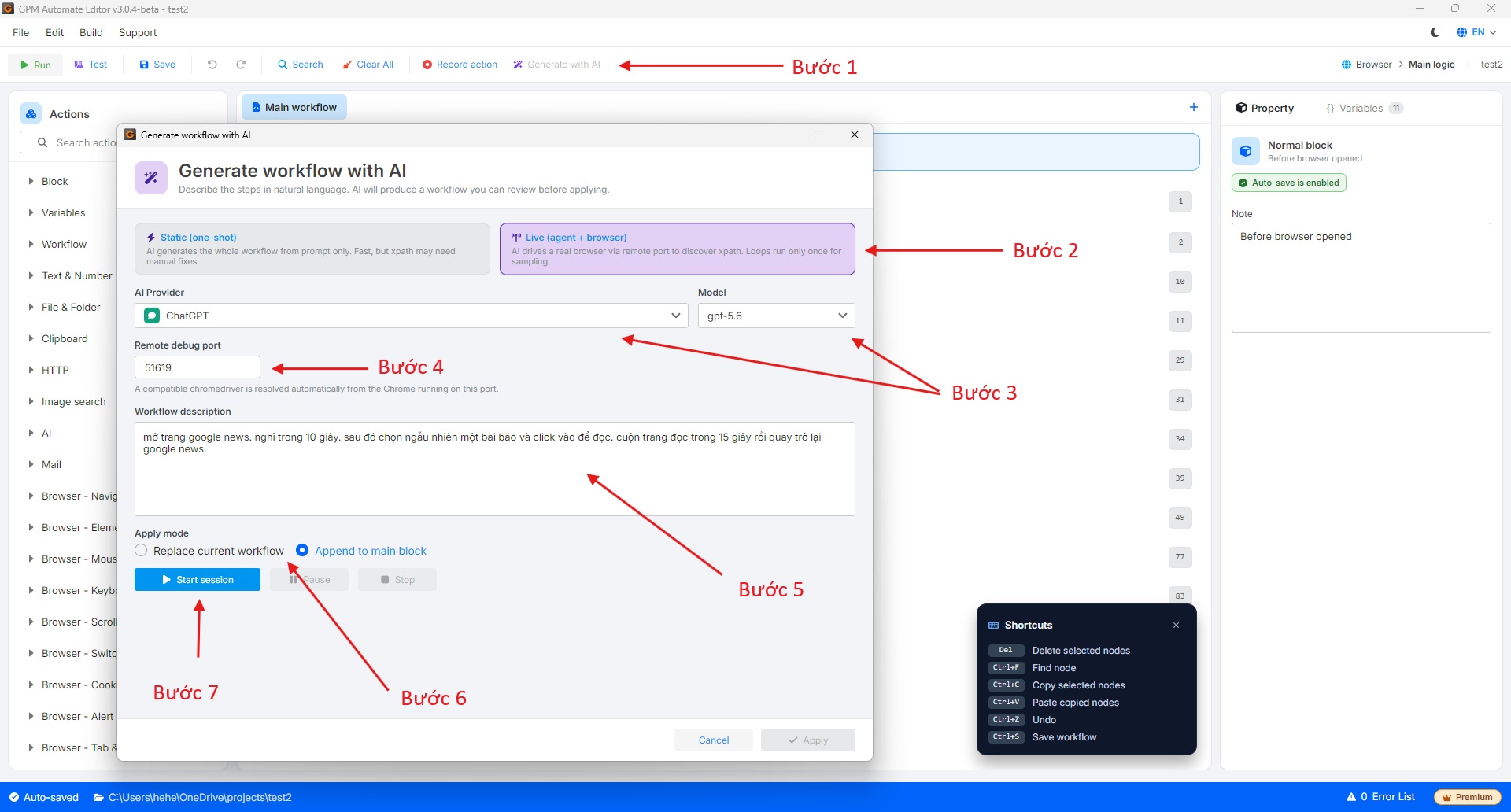
* Trên thanh công cụ của GPM Automate, chọn **Generate with AI**.
* Cửa sổ cấu hình Gen AI sẽ hiện lên với các thông số:
* **Remote debug port:** Dán Port (cổng) đã lấy từ GPM Login ở Bước 1 vào ô này để kết nối với profile.
* **Chế độ (Mode):**
* **Static:** Tự gen theo kịch bản, AI tự giả tưởng ra XPath mà không có Agent lướt web.
* **Live:** Agent trực tiếp lướt web đọc full cấu trúc trang và lấy XPath chuẩn xác như người thật.
* **AI Provider:** Chọn nhà cung cấp AI (**ChatGPT/OpenAI**, **Claude**, **Gemini**, **DeepSeek** hoặc **Custom AI** đã tự cấu hình trong phần Cài đặt của GPM Automate), sau đó chọn **Model** phù hợp.
* **Workflow Description:** Nhập câu lệnh/mô tả kịch bản tự nhiên mà bạn muốn khởi tạo.
* **Apply Mode:**
* **Replace current workflow:** Thay thế toàn bộ kịch bản hiện tại.
* **Append to main block:** Chèn tiếp các action mới vào cuối kịch bản chính.
* Nhấn **Start session**, trình duyệt sẽ tự động mở và chạy thực thi quá trình phân tích kịch bản.
#### 3️⃣ Bước 3: Quan sát kết quả
* Sau khi trình duyệt tự chạy và hệ thống hoàn tất quá trình Generate, nhấn **Apply** để đẩy các action vừa tạo vào workflow.
* Bạn theo dõi các khối lệnh được chèn vào giao diện GPM Automate và tiến hành kiểm thử kịch bản để tinh chỉnh nếu cần thiết.
---
# Agent Instructions
This documentation is published with GitBook. GitBook is the documentation platform designed so that both humans and AI agents can read, navigate, and reason over technical content effectively. Learn more at gitbook.com.
## Querying This Documentation
If you need additional information that is not directly available in this page, you can query the documentation by asking a question.
Perform an HTTP GET request on the following URL with the `ask` and `goal` query parameters:
```
GET https://docs.gpmautomate.com/gioi-thieu-chung/huong-dan-gen-ai-workflow.md?ask=&goal=
```
`ask` is the immediate question: it should be specific, self-contained, and written in natural language.
`goal` is what the user is ultimately trying to achieve, the reason they need the answer. Sharing it helps GitBook give you a better, more relevant answer. A goal is most helpful when it describes the outcome the user wants rather than restating the question. For example, with `ask=how do I create an API token`, a goal like `automate deployments from our CI pipeline` lets GitBook tailor the answer to that use case.
The response will contain a direct answer to the question and relevant excerpts and sources from the documentation.
Use this mechanism when the answer is not explicitly present in the current page, you need clarification or additional context, or you want to retrieve related documentation sections.