> For the complete documentation index, see [llms.txt](https://docs.gpmautomate.com/llms.txt). Markdown versions of documentation pages are available by appending `.md` to page URLs; this page is available as [Markdown](https://docs.gpmautomate.com/huong-dan-cac-action/element/wait-element.md).
# Wait element
Hành động này giúp tool tạm dừng và "canh" đến khi nào một thành phần trên trang web (như nút bấm, ô nhập liệu) xuất hiện thì mới làm việc tiếp. Nếu quá thời gian chờ mà chưa thấy, tool sẽ tự bỏ qua.
* Tác dụng: Giúp tool chạy "nhịp nhàng" với tốc độ tải của web. Thay vì phải dùng lệnh chờ cố định (Delay) làm mất thời gian, lệnh này giúp kịch bản chạy nhanh nhất có thể và tránh được lỗi không tìm thấy phần tử do web tải chậm.
🎥 Xem thêm video hướng dẫn: [Tại đây](https://youtu.be/AwlJt1TG80U).
#### Tham số cấu hình:
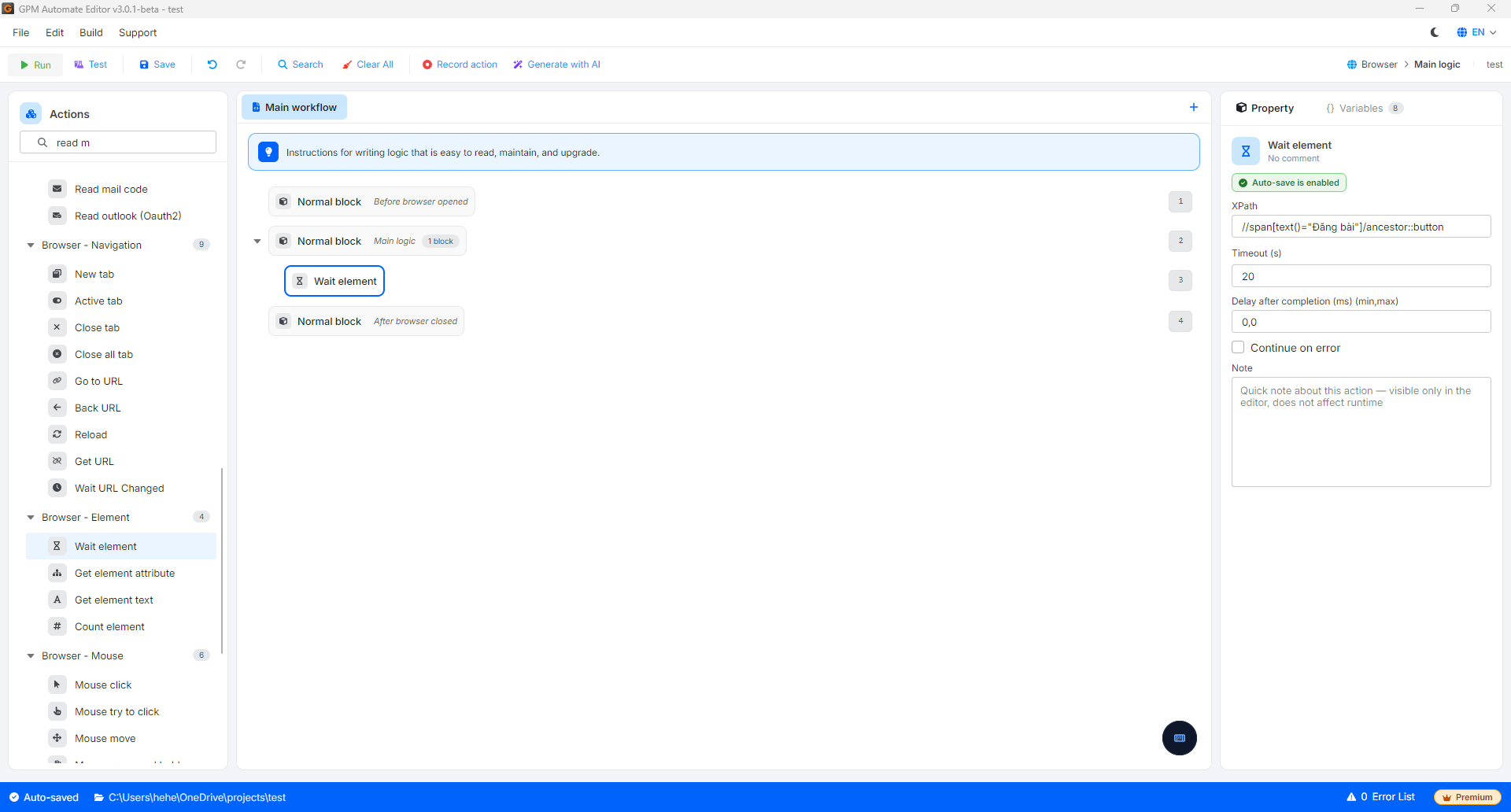
* Element XPath: Đường dẫn mã định danh (XPath) của phần tử bạn cần chờ đợi trên giao diện trang web (Ví dụ: `//button[@type="submit"]`).
* Timeout (s): Thời gian giới hạn tối đa (tính bằng giây) để hệ thống ngồi chờ phần tử xuất hiện. Nếu quá thời gian này mà phần tử vẫn chưa tải ra, kịch bản sẽ tự động chuyển sang hành động tiếp theo trong luồng.
#### Ví dụ thực tế: Chờ nút "Đăng bài" sẵn sàng sau khi tải ảnh lên
Khi bạn làm kịch bản tự động đăng bài (Post bài) lên mạng xã hội. Sau khi bạn chọn tệp ảnh và nhấn tải lên, hệ thống trang web cần một khoảng thời gian để xử lý và render hình ảnh đó lên server. Nút "Đăng bài" thường sẽ bị mờ (Disabled) hoặc chưa xuất hiện cho đến khi ảnh tải xong hoàn toàn.
* Cách cấu hình: Ngay sau hành động tải ảnh, bạn chèn hành động Wait element.
* Element XPath: Nhập XPath của nút đăng bài, ví dụ: `//span[text()="Đăng bài"]/ancestor::button`.
* Timeout: Đặt `20` (20 giây).
* Logic vận hành: Hệ thống sẽ liên tục kiểm tra trang web. Nếu mạng khỏe và ảnh tải xong trong 2 giây, nút bấm xuất hiện, kịch bản sẽ lập tức chạy lệnh click để đăng bài ngay (tiết kiệm được 18 giây chờ vô ích). Nếu mạng yếu, hệ thống sẽ kiên nhẫn đợi tối đa đến 20 giây để tránh bị lỗi hụt luồng.
---
# Agent Instructions
This documentation is published with GitBook. GitBook is the documentation platform designed so that both humans and AI agents can read, navigate, and reason over technical content effectively. Learn more at gitbook.com.
## Querying This Documentation
If you need additional information that is not directly available in this page, you can query the documentation by asking a question.
Perform an HTTP GET request on the following URL with the `ask` and `goal` query parameters:
```
GET https://docs.gpmautomate.com/huong-dan-cac-action/element/wait-element.md?ask=&goal=
```
`ask` is the immediate question: it should be specific, self-contained, and written in natural language.
`goal` is what the user is ultimately trying to achieve, the reason they need the answer. Sharing it helps GitBook give you a better, more relevant answer. A goal is most helpful when it describes the outcome the user wants rather than restating the question. For example, with `ask=how do I create an API token`, a goal like `automate deployments from our CI pipeline` lets GitBook tailor the answer to that use case.
The response will contain a direct answer to the question and relevant excerpts and sources from the documentation.
Use this mechanism when the answer is not explicitly present in the current page, you need clarification or additional context, or you want to retrieve related documentation sections.