> For the complete documentation index, see [llms.txt](https://docs.gpmautomate.com/llms.txt). Markdown versions of documentation pages are available by appending `.md` to page URLs; this page is available as [Markdown](https://docs.gpmautomate.com/huong-dan-cac-action/phone-action/huong-dan-xac-dinh-xpath-va-toa-do.md).
# Hướng dẫn xác định XPath & toạ độ
Dùng công cụ GPM UI Automator để lấy XPath hoặc toạ độ của phần tử trên màn hình điện thoại.
Nhiều action trong nhóm Phone - Action và Phone - Element cần trỏ tới một phần tử trên màn hình điện thoại thông qua **XPath** hoặc **toạ độ**. Bạn dùng công cụ **GPM UI Automator** (Find XPath on BoxPhone) để lấy các giá trị này.
#### Các bước thực hiện:
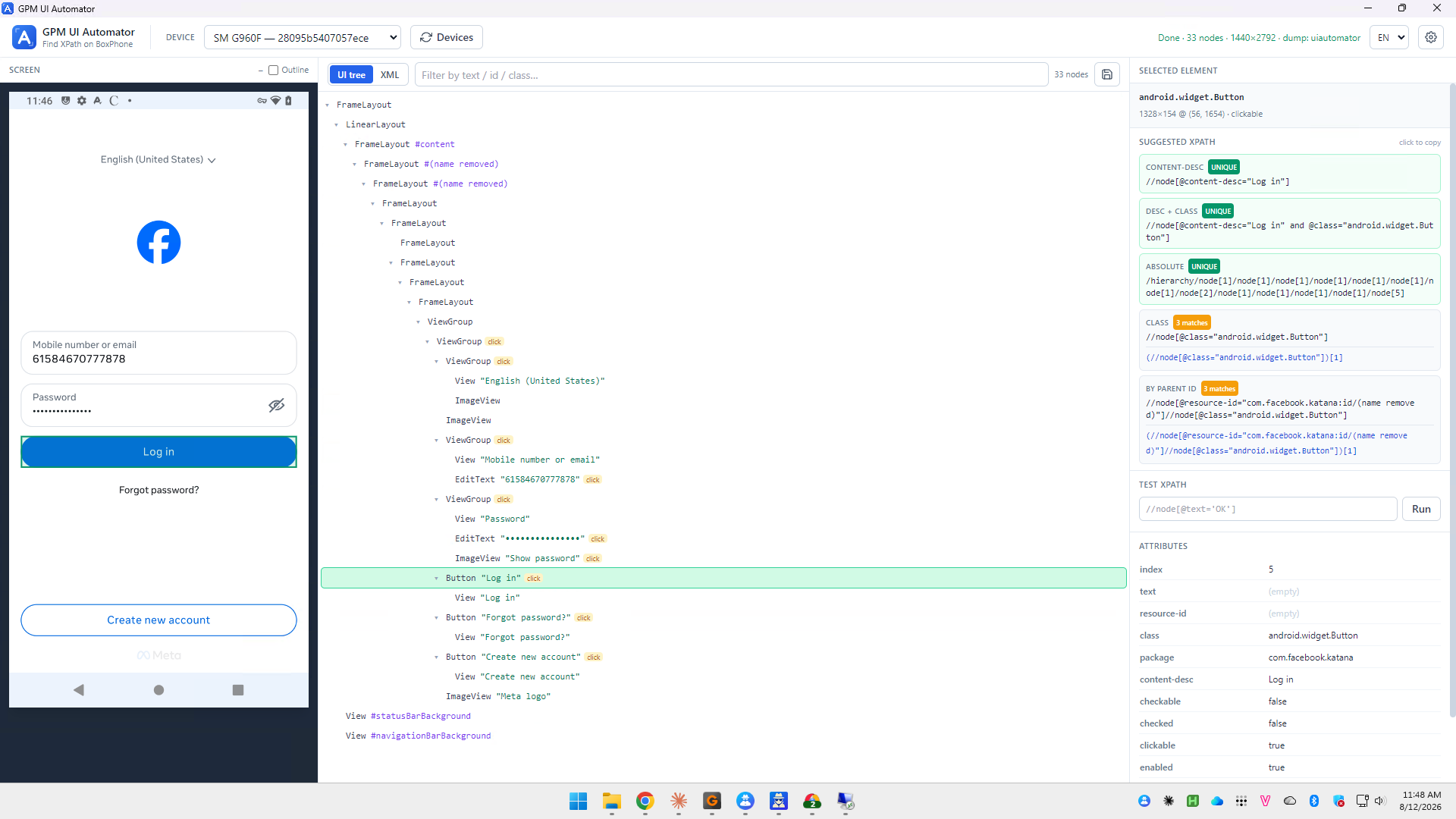
1. Chọn thiết bị ở ô DEVICE (ví dụ `SM G960F`). Bấm Devices để làm mới danh sách nếu chưa thấy máy.
2. Mở đúng màn hình cần thao tác trên điện thoại, rồi bấm Capture để chụp và dựng lại cây giao diện. Có thể xem dạng cây (UI tree) hoặc mã (XML), lọc nhanh bằng ô Filter by text / id / class.
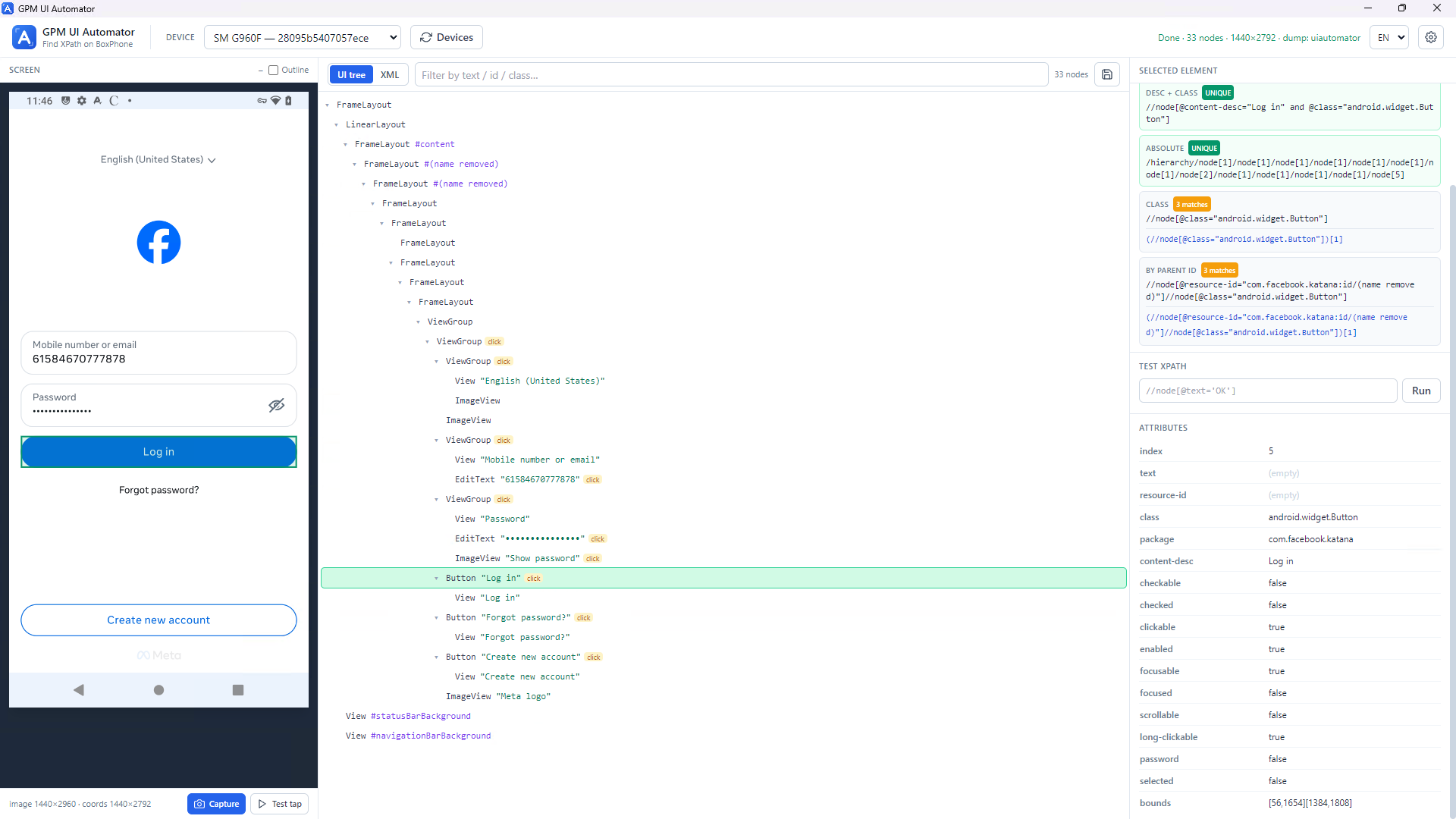
3. Bấm chọn phần tử cần lấy — trong cây hoặc ngay trên ảnh màn hình bên trái. Phần tử được chọn sẽ sáng lên và hiện thông tin ở khung SELECTED ELEMENT bên phải.
#### Lấy XPath:
Khung SUGGESTED XPATH gợi ý sẵn nhiều kiểu XPath kèm nhãn cho biết mức độ chính xác:
* `UNIQUE`: chỉ khớp đúng 1 phần tử — nên ưu tiên dùng để chạy ổn định.
* `n matches`: khớp nhiều phần tử, cần cân nhắc trước khi dùng.
Các kiểu gợi ý gồm: CONTENT-DESC, DESC + CLASS, ABSOLUTE, CLASS, BY PARENT ID. Bấm "click to copy" để sao chép XPath, rồi dán vào ô XPath của action. Có thể kiểm tra lại bằng ô TEST XPATH rồi bấm Run.
#### Lấy toạ độ:
Khung ATTRIBUTES hiển thị thuộc tính của phần tử, trong đó `bounds` là toạ độ khung dạng `[x1,y1][x2,y2]`. Toạ độ tâm phần tử là trung điểm của khung này. Bấm Test tap để thử chạm vào phần tử nhằm kiểm tra.
---
# Agent Instructions
This documentation is published with GitBook. GitBook is the documentation platform designed so that both humans and AI agents can read, navigate, and reason over technical content effectively. Learn more at gitbook.com.
## Querying This Documentation
If you need additional information that is not directly available in this page, you can query the documentation dynamically by asking a question.
Perform an HTTP GET request on the current page URL with the `ask` query parameter, and the optional `goal` query parameter:
```
GET https://docs.gpmautomate.com/huong-dan-cac-action/phone-action/huong-dan-xac-dinh-xpath-va-toa-do.md?ask=&goal=
```
`ask` is the immediate question: it should be specific, self-contained, and written in natural language.
`goal` is optional and describes the broader end goal you are ultimately trying to accomplish on behalf of the user. GitBook uses it to tailor the answer towards what is most useful for that goal.
The response will contain a direct answer to the question and relevant excerpts and sources from the documentation.
Use this mechanism when the answer is not explicitly present in the current page, you need clarification or additional context, or you want to retrieve related documentation sections.